
Writing from a phone
The trick is that a bare filename in an image line resolves against the incoming/ staging directory:
- Shoot a photo, upload it via any SFTP client into
<repo>/incoming/(setup: Getting started). - SSH into the server,
./blog.sh add, and write-- no path. - If the photo hasn't finished uploading yet, the CLI waits and re-checks on Enter instead of failing.
- On save the photo is copied into
media.nosync/<year>/<slug>/and itsincoming/copy is removed -- an emptyincoming/means nothing is pending. - Editing that post later doesn't need the photo again: a bare filename is looked for in the post's own
media.nosync/<year>/<slug>/first and inincoming/only after that, so a file that's already been saved resolves without any upload (and without being copied again).
iPhones photograph in HEIC by default, which only Safari can display. Attaching one stops the save with the exact conversion command -- or, with media.convert_heic: true in config/site.yml, the engine converts it to JPEG itself during the save (detected by content, so a HEIC named .jpg is caught too; AVIF, which browsers do display, is left alone). The simplest fix is on the phone itself: Settings → Camera → Formats → Most Compatible.
A photo's GPS position never reaches the site. Saving strips the place of capture from the file's metadata (media.strip_location, on unless config/site.yml turns it off -- the notes there say why); the camera, the moment and the orientation stay. ./blog.sh doctor --strip-location cleans photos saved before the engine did this -- the only thing doctor ever writes.
Video from the same phone is mentioned, not refused. The same setting decides the codec, and the save says one line when it matters: that a clip is HEVC (most browsers play it, the rest show an empty player), or that it is a QuickTime .mov (the video inside is usually ordinary H.264, but not every browser accepts the container). Both come with the ffmpeg command that fixes them -- re-encoding for the codec, repacking for the container, which copies the video across untouched. A third line is about neither: a video whose index sits at the end of the file, which is where a recorder has to put it, and which makes a reader wait for the whole download before the first frame appears. The same repack moves it to the front.
media: remux_video: true has the engine do that repack itself, when ffmpeg is on the machine -- index to the front, .mov to .mp4, the picture and the sound copied across untouched, about a second for a phone video. Every video and sound track comes across, not just the first of each, and so does the recording time; the metadata tracks an iPhone adds to a .mov do not, because an MP4 has nowhere to keep them. It is off by default, like the HEIC conversion, because it shells out to a tool the engine does not ship. Unlike the HEIC conversion it never refuses: no ffmpeg, or a repack that will not go through, and the post is saved with the file as it arrived and the sentence the author would have had anyway. A video in the wrong wrapper still plays for nearly everybody; a HEIC photo does not.
The post is saved either way; the only hard stop for a video is the per-file size limit, and a long 4K clip reaches that on its own -- a phone clip out of the share sheet runs about 1.3 MB a second, so the 24 MB default is roughly seventeen seconds of it. A longer one wants a smaller size chosen in the shortcut's own Encode Media step.
Handing over a whole file
Every step above is a conversation: the CLI opens an editor, waits for a photo, asks what to do with the draft. ./blog.sh add <file> is the same work with the conversation removed -- it takes a markdown file with the usual header, writes the draft, and returns. It never asks anything, so it is the route for a shortcut, a script or anything else running where nobody is at the keyboard. The file is read as the editor's buffer is: a line starting with // is a note to yourself and does not reach the post (//--more--// is the one that does, and a // inside a code fence is the code), and neither does a <!-- ... --> block.
./blog.sh add clanek.mdA bare name -- one with no slash in it -- is looked for in incoming/, so the file can arrive by the same upload as the photos. Anything else is a path and is used as given, relative to wherever you were standing. A file that came out of incoming/ is deleted once the post is written -- the photos already work that way, and an empty incoming/ is what says nothing is pending. A file outside incoming/ is never touched: on a Mac that is quite possibly the only copy. The rule is about where the file is, not how you named it, so ./blog.sh add "$PWD/incoming/x.md" tidies up after itself like any other upload.
Where the wizard would ask, this refuses instead, and writes nothing:
- a photo that has not finished uploading -- the wizard waits and re-checks on Enter; here there is nobody to wait for, so the missing names are printed and the post is not written. Upload them and run it again.
- an empty body, a file that is not text, a file this account cannot read, something that is not a file at all, an option the command does not have, or a second filename (one file, one post -- a name silently dropped is a post a looping script thinks it made).
It stops at the draft. The file says write this down, not put it in front of the world -- publishing stays a second command:
./blog.sh publish <slug> --yes--yes answers the draft dialog with "publish" in advance. --json, which needs --yes beside it, prints the same object add --json does -- ok, slug, path, state, scheduled, date, url, deploy, warnings, the keys every action on a post answers with -- or a refusal with its reason as a code (not_found, already_published, publish_refused), and leaves with zero either way, for the reason add does: a phone throws away the output of a command that failed. --no-announce publishes the page and sends nothing to Mastodon or Bluesky; it works with or without --yes, and because nothing was attempted, ./blog.sh toot <slug> can still send the announcement by hand afterwards. (It does not travel into a scheduled publish -- the cron works from the post itself and will announce it when its date arrives; the run says so if you schedule under the flag.)
One question --yes will not answer for you: a post dated outside the recent window is published but not announced, and the run says so. Announcing is the one step that cannot be taken back. Two more it refuses rather than guesses: --yes needs the slug spelled out (without one, publish offers the drafts to pick from, and picking belongs with the preview in front of you), and it will not choose between two posts sharing a slug in different years -- it names the years and stops.
--json turns the answer into data -- one object on standard output and nothing else, so a caller can read it without parsing prose:
{
  "slug": "psano-v-posteli",
  "path": "/home/me/blog/content.nosync/posts/2026/psano-v-posteli.json",
  "state": "draft",
  "url": "https://example.com/draft/89260b63fb498e75/psano-v-posteli/",
  "deploy": "done",
  "warnings": []
}
Every key is always there. deploy is done when the site is already carrying the draft and pending when it owes an upload that the next scheduled run will finish -- the difference between "open this address now" and "open it shortly". warnings collects everything the run said for itself, which on this route is the only place to hear it: a photo over the size limit, a video whose container some browsers refuse, a HEIC that was converted. url is empty rather than half an address when the site has no base_url yet, and the reason is in warnings. The exit code is 0 or 1, nothing else. A refusal answers in the same place and leaves with zero too, as a different object -- ok, error, message -- because the status answers a question the object cannot: whether an answer arrived at all. Only a flag the command does not have and a second filename fall outside this, and those end in prose on standard error.
A post sent from the phone itself
This page and its shortcut are on their way out. Native apps for iOS and Android are in preparation; they reach the engine over the same SSH (Over SSH, from an app) and need neither. 1.11 removes /write/ -- the page and everything published under that address -- the SendPost shortcut and the publish.txt and drafts.txt requests described below. In 1.10 everything in this section works as written -- but for the link that opens a draft (Editing a draft from the phone) -- and nothing is being added to it. Two things stay, because the apps use them as the page does: the receiver itself, scripts/receive.sh, and the receipt: line of a delivery, which is what makes a delivery that arrives twice one post.
write: true publishes a page at /write/ to write the post on: a title, the text, tags, and photographs each with its description. It keeps what is typed in the browser, so closing the tab in a tunnel loses nothing -- the text in localStorage, the bytes of the pictures and videos in IndexedDB, which holds hundreds of megabytes where localStorage holds five. The page is marked noindex and holds no secret of its own -- what sending needs is the key, and that lives in the shortcut on the phone. Add it to the home screen and it opens as an app -- that is what the manifest among the published files is for.
It also carries a content policy of its own, which is the one thing it could not inherit: the page is copied onto the site as a file and never goes through the layout every other page is rendered by, so until 1.7 it had none. Now it does, and it is a short list -- scripts and styles from the blog, pictures and video only as the page's own data: and blob: bytes, one place to connect to (itself, for the receipt), the preview frame same-origin, no form action at all, and scripts never inline. A reply arriving in the address bar has nowhere to reach even if it carried something that ran.
The page is the same file on every site; what is this site's the build writes beside it as write/site.js: the short name and claim for the header, the palette from colors: so the page is dressed like the blog, the favicon, and every tag the blog has used, with its count of all time and of the last twelve months. The tags are offered as they are typed: with nothing typed yet, what the blog has tagged in the last year, most used first -- not the most used of all time, which on an imported archive are the places it came from; then whatever begins with or contains the letters so far, searched across every tag. So a tag is tapped rather than typed, and typed as it was before instead of the blog growing a second spelling of it.
The page speaks the blog's language, site.lang, whatever the phone is set to; the browser's is used only where there is no site.js, or where the blog's language is one the page has not been translated into. Above the text sits a row of marks -- bold, italic, strikethrough, code, link, heading, quote, list, numbered list, code block. A paired mark wraps what is selected, and a second tap takes it off; with nothing selected it puts the pair in and leaves the caret between. A line mark goes to the start of every line the selection touches, and comes off the same way. The link mark reads the selection, widened to whole words: an address -- https://…, or a bare domain, which gets its https:// -- becomes a link with the words left to type; words become one with the address left to type.
A picture does not travel as it is. The page draws it through a canvas first -- 2560 px on its long edge, JPEG at quality 0.88 -- which is what makes a post of four photographs fit under the ceiling at all, and it is why the file arrives as vlak-v-chocni.jpg whatever the phone called it: the name is folded to ASCII so the markdown can name it without escaping, and a second picture folding to the same name gets -2. A picture this browser cannot decode -- a HEIC outside Safari -- is passed through untouched under its own extension. Send the original by SFTP and use add if the re-encode is not what you want.
A video goes the same way as a picture -- the same button, the same card, the same description -- and into the text as !![description] (clip.mp4), two marks where a picture has one. Nothing on the page shrinks it: it travels as it is, and the blog says on arrival what it says of any phone video (see below). What limits it is the receiver's ceiling on one delivery, BLOGSH_MAX_MB (24): the page carries that number in site.js, says under the pictures what happens to a picture, what to a video and how much the server takes, and turns the batch line red the moment the post outgrows it -- before the phone spends the upload finding out. The first tap on Send stops there and says it; a second tap sends anyway, because the page's number is the build's and the server's may have been raised since. The receiver reads the variable in its own environment, the forced command's, and the build reads it in the build's; raise it in both places or in neither.
Preview, under the text, shows the post as the blog would show it -- in the blog's own stylesheets, which site.js names, with the pictures in their places. Near enough, not exact: the engine renders the real thing, and the draft's preview after sending is that. What it is for is seeing the shape of a post before it leaves the phone.
Pressing send hands the files to iOS: one for each picture, and one for the text. Nothing is packed for the server: it takes files, not archives. A browser that refuses to hand files over at all gets the post saved as one archive instead -- a net, so a post written on the way home is not lost to a browser that will not share it, rather than a road this page offers. /write/ is for a phone; on a phone the files go over.
Under Chromium the text is called <name>.md.txt. Chrome and Edge, on Android as at a desk, share from a page only a file whose extension is on their own list, and .md is not on it while .txt is; a .md is refused before any sheet opens, and canShare says true all the same. The page tells Chromium by navigator.userAgentData and names the text accordingly; the receiver puts the .md back, so whatever takes the files on such a phone passes them on under the names it was given and nothing else. WebKit keeps .md, and must: iOS reads a .txt as text rather than a file and hands the shortcut its first line for a name. A browser the page misjudges gets a second tap -- the refusal says so -- which sends the text as .md.txt. Note what the list also leaves out: .zip, .heic and .mov. A video from an Android phone is .mp4 and goes; the saved archive never went anywhere but a shortcut anyway.
One shortcut, run twice, because the run that receives the files may not open an SSH connection. A shortcut started from the Share Sheet runs in Shortcuts' background runner, whose only screen is a banner; Run Script over SSH asks for a screen there -- the host prompt, the first-run privacy question -- and is refused with "This action could not be run with the current user interface", before any connection is made. The action that would hand the run over to the full app, Continue in Shortcuts App, is no longer offered. A shortcut started from a URL, on the other hand, always runs in the app. So the same shortcut runs twice: from the Share Sheet it packs the files into one batch, writes it to a file and opens a URL that names itself; from that URL, with nothing handed to it, it reads the file back and sends it. The two runs are told apart by the one thing that differs between them, whether there is a Shortcut Input. One shortcut per blog.
"Show in Share Sheet" on, accepting Images and Files; "If there's no input": Continue -- not Stop and Respond, because the second run has none and has to go on. Then:
- If Shortcut Input does not have any value -- the second run. Inside it:
- Get File
incoming/batch.txtfrom the Shortcuts folder in iCloud Drive, without the document picker. A folder chosen in the action, not a variable; see the warning below. - Run Script over SSH with that file as the Input; the script is the receiver, or the wrapper that reaches it.
- Base64 Encode the Shell Script Result (Line Breaks: None, if the option is offered; the page copes either way).
- Delete Files with the File from Get File, Immediately Delete on. Without the switch it asks before every post; without the action a batch already sent would wait for the next run that finds nothing to share, and go out a second time.
- Text:
https://YOUR-BLOG-URL/write/#b=followed by the Base64 Encoded variable, with nothing between them. - Open URLs with that text.
- Stop and Output the result, or Stop This Shortcut -- the second run ends here and never reaches the loop below.
- Get File
End If. 2. Repeat with Each over Shortcut Input -- the first run -- and inside it: Get Name, Get File Extension, then a Text holding mov mp4 m4v MOV MP4 M4V and an If Text contains File Extension. Inside the If: Encode Media the Repeat Item with Size 1280x720, and Set Variable item to Encoded Media; in Otherwise: Set Variable item to Repeat Item. After End If: Base64 Encode item, a Text of three lines -- Name.File Extension, Base64 Encoded, . -- and Add to Variable batch.
The If is what makes a video from the phone fit: a clip from an iPhone, 32.5 MB of HEVC, came out of Encode Media at 5 MB of H.264, in the QuickTime container it arrived in, so the extension the batch names is still right. A picture takes the Otherwise branch untouched. The page cannot know the shortcut does this, so its red line for a video measures the original; send anyway, and the answer says what arrived. 3. After the loop: Combine Text batch with New Lines. 4. Save File the combined text to iCloud Drive, into the Shortcuts folder, Ask Where to Save off, subpath incoming/batch.txt, Overwrite If File Exists on -- the same file step 1 reads back. 5. Open URLs: shortcuts://run-shortcut?name=SendPost, where SendPost is the shortcut's own name, spelled as the library spells it. Rename the shortcut and this line has to change with it; a name without spaces or punctuation saves percent-encoding it.
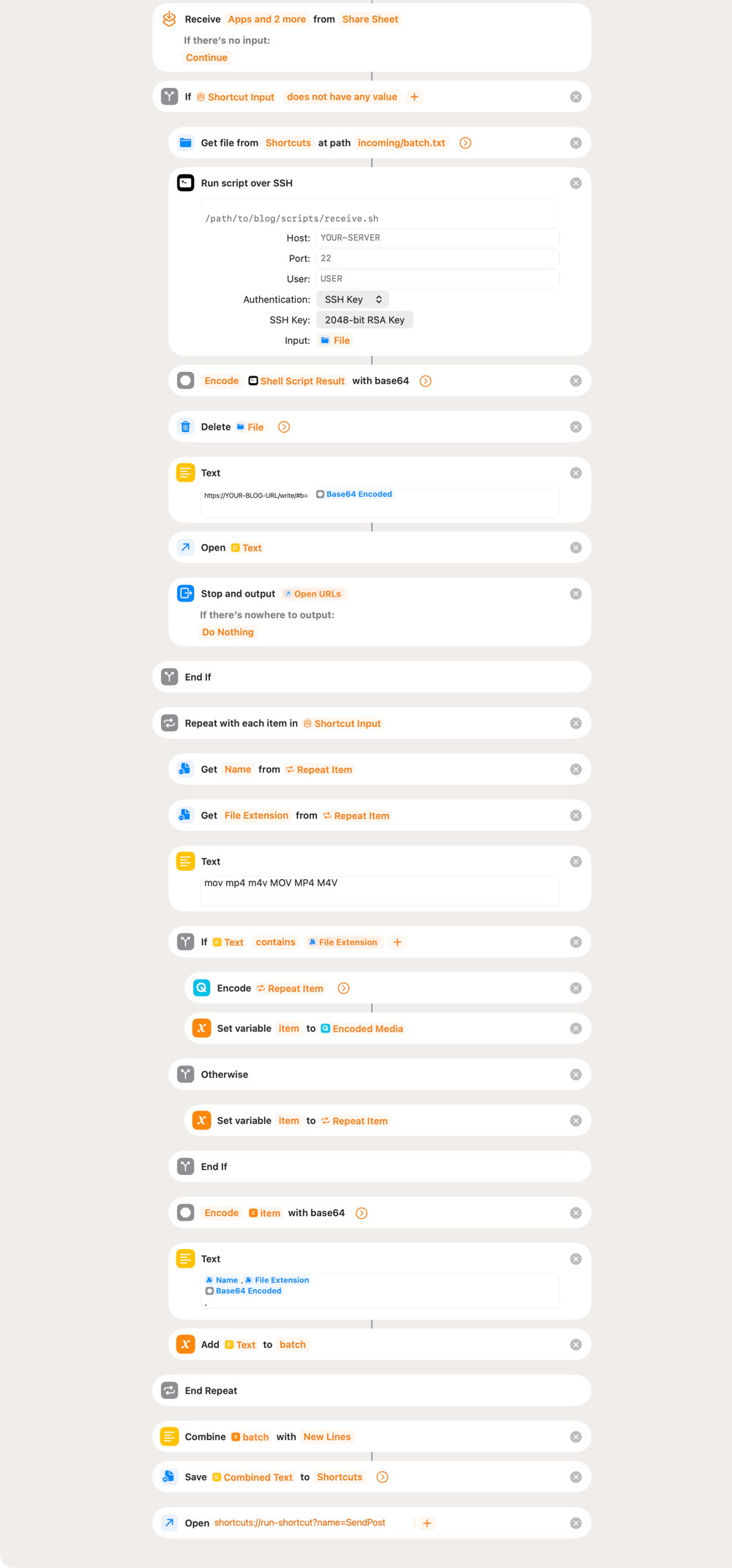
It can be imported instead of built: SendPost, signed so that anyone may import it. It arrives called SendPost, and the last Open URLs opens it by that name; rename it and change the name there to match. Then fill in what is yours. In Run Script over SSH: the machine you log into (a host name or an IP address), its SSH port, the user, and the path to scripts/receive.sh or the wrapper that reaches it. In the Text: YOUR-BLOG-URL is the address the site is served at, base_url in config/site.yml. The SSH action carries no key; pick or generate one there and put its public half on the server, as the key line below shows.
⚠️ Pasting actions between shortcuts rewires them. Shortcuts reconnects a pasted action's inputs to whatever stands above the place it lands. A Get File copied in this way came back reading from a Text, then from If Result, then from Shortcut Input -- which is empty in the second run, so it read nothing, the SSH action sent nothing, and the server answered empty_input for a batch that was whole. After any paste or move, check that Get File still reads from Shortcuts, and that the SSH Input and Delete Files both name the File it produces.
It runs on a Mac as well. The Shortcuts app there has the same shortcut through iCloud, Safari's Share Sheet offers it, and the terminal runs it: shortcuts run SendPost with a batch.txt in the Shortcuts folder sends that batch and prints the address it would have opened -- which is how the sending half is tested without a phone. /write/ itself is still made for a phone.
Base64, not URL Encode, and not for taste: Shortcuts reads a reply that is JSON as a Dictionary and then refuses to hand a Dictionary to URL Encode -- "couldn't convert from Dictionary to Text" -- on exactly the replies that matter, the refusals. Base64 Encode takes anything. (The page also still reads a percent-encoded reply after #r=.)
Base64 Encode, the Text and Open URLs carry the answer back to the page. It opens with the reply after #b= -- a fragment, so it never leaves the browser -- and says what the server did: the pictures it kept, the draft's preview address or the post's public one, the command that publishes a draft from a keyboard, and a refusal in the reader's language where the page knows the code, in the server's own words where it does not. A post the server took is cleared from the device; a refusal keeps everything, so it can be mended and sent again.
And the page asks, as well as waiting. That road back has one break in it that nothing on this end can mend: a page kept on a phone's home screen runs with storage of its own, so a reply that arrives as a URL opens in the browser, where the draft it is about does not exist -- and the draft stays on the home-screen copy, looking unsent. So the page picks a name for its answer before it sends anything (receipt:, sixteen hexadecimal characters, written into the markdown), and the build leaves a small JSON file at /write/r/<receipt>.json saying the slug, the state, the title, the address, and whatever the save had to complain about -- a picture whose size could not be read, a video that will make the reader wait, a player that was not found. The page draws those the way it draws the answer that comes back through the address bar, because the phone is the one place with no terminal to read them in. Only what was said about the POST: the file is served to anyone who has the sixteen characters, so what the run says about the SITE afterwards (a missing base_url, whatever the rebuild warns about) stays out of it. The page asks for it every three seconds for fifteen minutes, and says so if it never comes; a page reopened later asks once more, and shows the answer or says it did not come. Whichever answer arrives first is the one that is shown.
The file is written by the BUILD, which is what keeps it true: publish the post and the next build says published and gives the public address; delete the post and nothing generates the file, so the sweep takes it away. It exists only on a site that serves the page, and only for a post that asked for one.
Publishing from the phone. The answer for a draft carries a Publish button, and it sends one file called publish.txt holding the slug -- down the same connection, through the same shortcut. The receiver knows that shape: exactly one file, called that, and it runs publish <slug> --yes --json rather than storing anything. The slug is checked as hard as a filename is, because it becomes an argument to a command: a leading dash is a flag, and anything outside a slug's own alphabet is refused here rather than explained by whatever it hits. The page then asks the same receipt again until it says published.
Editing a draft from the phone
This is what an app does: it asks the blog for its drafts (drafts --json) and sends the text back with edits: <slug> and base: <digest> in its header -- see Over SSH, from an app, and the header keys for what such a save keeps and what it refuses.
The page was given a link for it too, Open a draft from the blog, which sends one file, drafts.txt, through the shortcut and waits for the list of drafts in the address. Tried on a tablet it loaded nothing, and it is not being repaired: the page is frozen and leaves in 1.11.
A delivery that arrives twice is one post. The receipt is minted once per send, immediately before the files it names are built, so two deliveries carrying the same one are the same send arriving twice -- which is what a connection that breaks after the bytes have gone but before the answer comes back produces, and both the shortcut and the Termux script retry. The second delivery updates the post the first one wrote instead of founding another beside it -- and that holds when the retry arrives while the first is still being written, because writes carrying a receipt take turns. Once the post is published, a late retry stops updating anything at all: it is answered with the published post, at its public address, and the file is left exactly as it stands. The copy the phone is still holding was made before publishing happened and cannot know about it, so letting it write would put the post back to draft -- with a new address, a new date and the announcement pointing at nothing. Pressing send again is not that: the page mints a fresh receipt each time, so a second send is a second post. A delivery carrying no receipt at all -- anything hand-rolled -- has nothing to be recognised by, and a repeat of one is two posts as it always was.
One connection carries the post however many photographs are in it, which is the point: connections are the scarce thing, not bytes. The first run in the app asks whether the shortcut may send its items to the host -- answer Always Allow; that is the very question the background runner could not put on screen.
The page that sent the files sees the share end in an abort -- that is how the hand-off to the app looks from a web page, not a failure -- so it says the files have left. The answer arrives when the second run opens the page again with it.
The order inside the batch matters, because the markdown arriving is what makes the post and everything its text names has to be on the server by then. The app puts the markdown last for exactly this reason. Get it wrong and nothing breaks -- the engine answers missing_images and writes nothing, and sending the text again once the pictures are up is all it takes.
Draft or public is decided when the post is sent. The page has a switch, Draft or Publish now; Draft is the default and writes nothing. Publish now writes publish: yes into the front matter, and add then takes the road publish <slug> --yes takes at a desk: the date is settled, the announcement goes out to the networks the site has configured, the site is rebuilt and deployed, and the answer carries the public address rather than a draft one. There is no third state: a post that is public is announced, on a phone as at a desk. The key is only read by add <file>; the wizard never publishes directly.
add <file> wants the file to be on the server already. receive.sh is how it gets there: the whole post down one connection. Each file is a name on its own line, its base64 after it, and a line holding a single . to say that was all of it -- then the next name.
{ for f in photo.jpg post.md; do
    printf '%s\n' "$f"; base64 < "$f"; printf '.\n'
  done
} | ssh blog ./scripts/receive.sh
One connection, not one per file. It was one per file once, which is simpler and does not work: a server worth running drops new SSH connections that arrive in a rush, and a common setting allows about four a minute. A post with three photographs sat exactly on that line and one with nine had no chance -- the sender saw "could not connect to the SSH server" and the pictures that never arrived were missed by nobody, since each connection answered for itself alone.
Every name in the delivery is read before a single byte is written, so a batch refused on its fifth name leaves nothing behind from the first four.
The closing dot is not decoration. A connection that drops halfway ends the same way a finished one does -- the receiver reads to the end of the stream either way -- so half a photograph arrived, decoded into half a picture, and was answered with ok. Without the dot the transfer is refused as truncated and nothing is stored.
A shortcut on a phone sends a whole post that way -- every picture, then the markdown, down one connection -- and the markdown last, because the markdown arriving is what makes the post. Everything its text names is already staged under the name it uses, so there is no other signal to send and none is needed. The answer to a picture is {"ok":true,"stored":"photo.jpg"}; the answer to the markdown is the same JSON add --json gives.
⚠️ The shortcut has to SHOW the answer, or every refusal looks like it worked. A refusal leaves with zero -- deliberately, because iOS Shortcuts discards the output of a remote command that failed, and the reason is the whole point of the answer. The cost is that Shortcuts then reports a tick for a refusal exactly as it does for a post. End the shortcut by opening the page with the answer, as the second run above does, or with a Show Content of the SSH output. The reply is one JSON object per file, so read it whole: a picture answers "ok":true and the name it was stored under, a refusal answers "ok":false and names the reason, and the post that was written answers with its slug (and, since 1.10, "ok":true like every other answer). Without that, a shortcut whose Input field is empty connects, waits out the thirty-second deadline, is refused for empty_input, and shows a tick -- which is a slow, silent way to learn nothing.
The exit code answers a different question from the JSON. Zero means an answer arrived -- read the object, which says "ok" and, when that is false, names the reason. Non-zero means there is no object to read at all: the script was killed, or the shell never got to run it. Everything the receiver can put into words leaves with zero, and that includes the refusals about the installation rather than the delivery -- no incoming/, no engine, a ceiling that is not a number. Which kind of trouble it is, the error code says. (iOS Shortcuts discards the output of a remote command that failed, so a refusal that exited non-zero reached a phone as a bare status with its reason gone -- exactly when the reason was the point, and those refusals are the ones a new install meets on its very first delivery.)
The body has a deadline of its own, BLOGSH_BODY_SECONDS (600): a delivery that has not finished by then is dropped and, if the sender is still listening, told timeout; it is set where BLOGSH_MAX_MB is, below. Two files under one name in one delivery are refused (bad_name) rather than one silently replacing the other, every body is decoded before any file is written, so a refusal on the third picture leaves nothing of the first two behind, and a blank line after a complete delivery is not held against it. When the engine itself does not answer in JSON -- no env.sh, no ruby, a configuration that will not parse -- the receiver answers for it with engine_failed and the words the engine printed, and every delivery ends with status 0 once an answer has been given -- a ceiling that is not a number (bad_limit) included.
Deliveries are taken in one at a time. From the first file of a delivery landing in incoming/ to the engine having taken them out again, a second delivery waits: incoming/ is one folder, a picture is known there by the name it was sent under, and two phones -- or one app sending two posts -- both call their first picture 01.jpg. The one that waits does so for up to BLOGSH_TURN_SECONDS (300, set where the other two are) and is then told busy, with nothing of it stored; send it again. A delivery that died mid-way does not hold the next one up.
A delivery that goes wrong halfway can simply be repeated. Pictures wait in incoming/ until a text names them, so a refused post leaves them where they are and sending it again finds them -- nothing has to be uploaded twice.
Nothing new listens on the network. It travels over the SSH the server already has, and the key it travels on wants a forced command:
restrict,command="/path/to/blog/scripts/receive.sh" ssh-rsa AAAA... phone
The key has to be RSA. Shortcuts' Run Script over SSH does not speak ed25519 and says nothing when it meets one -- the run simply fails.
What a stranger chooses is a filename and some bytes, so that is what is checked. A name carrying a path or a backslash, beginning with a dot, empty, longer than a filesystem will take, or holding a control character is refused (bad_name) and nothing is written. What arrives is bounded before it lands rather than weighed afterwards: BLOGSH_MAX_MB (24) is a ceiling on reading, so a sender costs that much and not whatever they felt like sending. The number is measured on the encoded stream, not on the files -- base64 is a third larger -- so a 24 MB ceiling takes about eighteen megabytes of photographs; the page's legend says the same, and the red line it draws counts the encoded size. A delivery that overshoots is read to its end into nothing -- up to four times the ceiling -- and then refused, so the sender finishes and hears too_large; refused the moment the ceiling was reached, a phone with megabytes still to send sat on "running" with no timeout to save it, and the answer never arrived. Beyond that bound the channel closes, and a hostile sender costs reading, never storage. And the post itself is handed to the engine as untrusted, so a picture may be named only by a bare filename --  is refused (bad_reference), because otherwise it would read that file into the post and publish it.
Raising the ceiling is two settings, not one. The receiver reads BLOGSH_MAX_MB from its own environment -- the one the forced command runs in: put it in the key's line, command="BLOGSH_MAX_MB=64 /path/to/blog/scripts/receive.sh", or, where the command is a wrapper that enters a container, in that wrapper (docker exec -e BLOGSH_MAX_MB=64 …). The page at /write/ never asks the server; it shows the number the BUILD saw in BLOGSH_MAX_MB when it wrote site.js -- so set the same value where the build runs (env.sh) and rebuild, or the page will warn at 24 while the server takes 64, or say nothing while the server refuses. Unset on both sides, both say 24.
There is deliberately no archive. An earlier design took a ZIP and unpacked it here; three adversarial audits found blocking faults in three successive rewrites of it, and nearly all of them lived in the unpacking -- entries that were symlinks, names that collapsed onto each other, a bomb that wrote gigabytes from megabytes, a half-failed extraction that published a truncated photograph and reported success. None of that can be expressed when there is nothing to unpack.